作者:Harrandi
发布时间:June 23, 2026
分类:随便写写,FPV
KISS, Keep It Super Simple.
KISS是一家德国公司Flyduino的飞控产品,我们的两位主角,Felix Niessen 和 Alexander Fedorov (Alex) 都曾为其工作,其中Felix算是主力开发者,而Alex则贡献了一个重要特性“Adaptive filter (自适应滤波)”。

可能Felix不太喜欢这个滤波(我瞎猜的),带着另外两个同事成立了新公司Fettec。操刀了新的Fettec飞控、电调以及新固件,可惜目前固件仍叫做Alpha。新固件里自然没有Adaptive filter。

Alex在Fettec之后推出了KISS Ultra飞控,并似乎也成立了公司,据称重写了绝大多数原先的KISS代码,并依据新的高性能MCU加强了Adaptive Filter。
从此我们得到了三个飞控,老KISS,FETTEC, KISS ULTRA。
其中Fettec飞控可以刷入原先的KISS固件,而KISS ULTRA几乎就是延续了老的KISS固件所以也没有“兼容”的必要。
我的想法:
我很高兴Fettec把价格降低了,之前的KISS电调我是用不起的,Fettec电调35A和45A都很好用。G4虽然性能不如H7系列但不会比F7差,G4 OSD版和45A电调我认为是很务实的选择。
KISS ULTRA,太鸡儿贵了,也不够新颖,所以没有用过,过。。。
一些资料: KISS飞控发布时的帖子:https://www.rcgroups.com/forums/showthread.php?2555204-KISS-FCv1-Flyduino-32bit-Flightcontroller
贴内有“Betaflight之父”和Felix的“互动”。他们就飞控算法展开了一些讨论!值得一看。
作者:Harrandi
发布时间:August 24, 2025
分类:FPV
If you’re building a remote surveillance system, giving your camera cellular connectivity with a Quectel EC20 module is a powerful upgrade. Once configured in ECM (Ethernet Control Model) mode, the module acts like a virtual Ethernet card, pulling an IP address directly from your mobile carrier.
This guide will walk you through the setup process on an SSC338Q-based camera. A key pro tip: we’ll configure a VPN like WireGuard or ZeroTier first. This crucial step will save you from being locked out of your camera once it switches to the cellular network, allowing for secure remote access without complex router configurations.
Prerequisites & Planning
Hardware: A camera with an SSC338Q chipset and a Quectel EC20 module (specifically variant 0x2c7c:0x0125).
Initial Access: Physical access to the camera or a connection to its local network for the initial setup.
VPN Setup: A configured VPN server (e.g., WireGuard or ZeroTier) installed on a cloud server, Raspberry Pi, or your local network. Ensure your camera can reach it and that you know how to connect your laptop to it.
Why VPN First? Once the EC20 module is active, your camera’s network interface will change. It will be on your ISP’s cellular network, not your local Wi-Fi. Without a VPN already running on the camera, you will have no way to SSH into it to complete the setup. The VPN provides a secure “tunnel” back to your device.
Step 1: Verify EC20 Module Detection
Start by establishing an SSH connection to your camera over your local network.
Run the lsusb command to list all connected USB devices. You should see a line identifying your Quectel module:
bash
ssh root@your-camera-local-ip
lsusb
Expected Output:
Bus 001 Device 003: ID 2c7c:0125 Quectel Wireless Solutions Co., Ltd. EC20 LTE modem
If you don’t see this device, stop here. Check your USB connections, cables, and power supply to the EC20 module.
Because the new config has been added so step2 is no longer needed.
Step 3: Apply the Configuration and Reboot
Now, we tell the system to use our new ec25 configuration and reboot.
Set the boot environment variable:fw_setenv wlandev ec25
Reboot the camera for the changes to take effect:reboot
⚠️ Important Note: After rebooting, the camera’s USB interface (usb0) will be assigned a static IP address: 192.168.2.10. To maintain SSH access during this phase:
You must set your computer’s Ethernet IP address to 192.168.2.1 (subnet 255.255.255.0).
Connect directly to the camera’s USB port or via a router configured for the 192.168.2.x subnet.
Step 4: Final Verification and VPN Connection
After the reboot and reconnection (via the 192.168.2.10 IP), SSH back into the camera.
Run ifconfig. You should now see a new network interface (likely usb0 or wwan0) that has obtained a public IP address from your cellular ISP. This means the EC20 module is working correctly!
Connect via VPN: Since you pre-configured your VPN, simply activate the VPN connection on your laptop. You should now be able to SSH directly to the camera’s VPN IP address from anywhere with an internet connection, no longer needing the 192.168.2.10 workaround.
Troubleshooting and Reverting
Something went wrong? If the configuration fails and you lose access, you may need a serial console connection to revert. If you can still access the camera, you can clear the wlandev setting:bashfw_setenv wlandev rebootThis will tell the camera to bypass the EC20 setup on the next boot.
No Internet on EC20? Check your APN settings. You may need to use udhcpc or additional scripts to handle the DHCP client process on the usb0 interface.
By following these steps and planning with a VPN, you’ve created a robust, remotely accessible cellular camera. Happy monitoring!
作者:Harrandi
发布时间:August 19, 2025
分类:FPV,微心情
Looking back, the FPV hobby has been through so many ups and downs. Yeah, I feel like ranting a bit…When COVID hit in 2020, along with shifting international relations, we saw an STM32 chip shortage. Experts claimed it was just a simple supply-and-demand issue. But years later, we can see that AT32 chips have taken over a significant portion of STM32’s market share. Many ESCs and other microcontroller applications are now dominated by AT32 – not entirely, but substantially. Don’t get me wrong, this outcome isn’t necessarily bad. I’m just saying the chip shortage period was a really unsettling experience for FPV.Then there’s the MPU6000 gyro being discontinued – we never got a perfect replacement. Even though Betaflight and Fettec have made big improvements in ICM gyro support, it’s still a huge loss for high-performance freestyle quads. Nobody cares about FPV; our market is just too small.The war led to BLHeli32 shutting down development – another massive blow to FPV. Manufacturers had to switch to AM32. I know BLHeli32 isn’t completely gone, but development has stopped. And I’ll say it outright: AM32 ESCs with ICM gyros are a disaster. Thankfully, if you want top-tier ESC performance, Fettec is an option – expensive, but performance-wise it definitely holds up against BLHeli32. I’m talking about freestyle here; for racing you’ll need to test it yourself. Of course, ICM gyros on Fettec flight controllers perform the same as on Betaflight – still not matching the MPU6000.There are rumors that Rapidfire’s new version under Orca isn’t as good as the original. I haven’t verified this myself – hopefully it’s not true.That’s all I can think of for now. Really hope the FPV hobby gets the attention and protection it deserves.
回首过去,FPV运动经历了太多的坎坷。是的,我又想逼逼了。。2020年随着covid的开始,以及国际关系发生的变化,stm32出现了芯片短缺潮。专业人士认为这仅是供小于求的原因造成的。多年后的今天我们发现亚特力已经替代了stm32相当一部分的市场,很多电调包括其它用途的单片机都已经是亚特力的天下了,尽管这不是绝对的情况。当然这个结果并没有什么不好,我只是想说FPV经历的芯片短缺潮这段时期是一个令人不安的经历。姿态传感器,MPU6000停产,我们没能有完美的替代品。尽管最新的Betaflight和Fettec 都对icm的支持有了较大的进步,但是对于高性能的穿越机来说还是一个巨大的遗憾。没有人关心FPV,它的市场太小了。战争,BLHeli32关闭了项目,这是另外一个巨大的冲击对于FPV来说。厂商们不得不转向AM32,我知道bl32并没有完全消失,但它已经停止了开发。我可以大言不惭地说am32电调搭配ICM传感器是一个灾难。幸运的是,如果你想要最高性能的电调,可以考虑fettec,虽然它很贵,但是性能绝对不在bl32之下。我说的是花飞应用,能否满足竞速的需求需要自己测试。当然,icm传感器在Fettec飞控上的情况和betaflight 一样,不会超过MPU6000的性能。Rapidfire 被Orca收购后推出的新版接收机据说,没有之前的性能强劲,这个情况我没有亲自验证,但愿不是真的。暂时想起来这么多,希望FPV运动可以得到重视和保护。
作者:Harrandi
发布时间:December 3, 2024
分类:FPV
OpenIPC Wiki
Table of Content
OpenIPC FPV ground station
News roundup
- It is now possible to record video to a connected SSD or USB stick
- Both HDMI and VGA outputs now work, there are no limitations in connected displays
- A lot of different things ;)
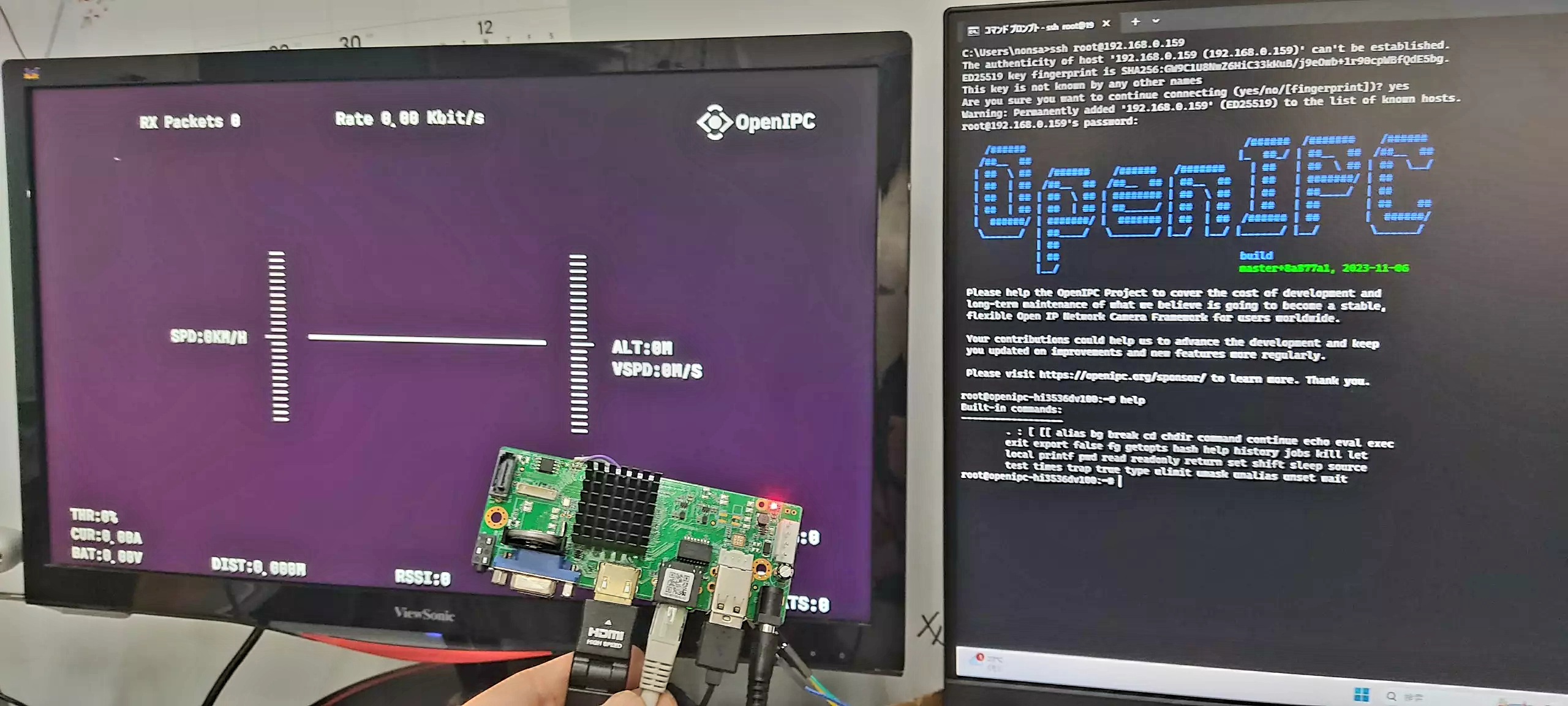
Upgrade from original HI3536DV100 NVR board firmware to OpenIPC FPV firmware
- Install PUTTY and TFTP server
- Download actual image for NVR from OpenIPC site
- Upload this image to your TFTP server
- Turn off NVR power, connect USB adapter to your NVR UART, specify which COM port on your PC
- Go to U-Boot with quick press Ctrl+C at power on
- Execute a set of commands each line separately
# Сhanging the ip address of the NVR board and the ip address of your TFTP server
setenv ipaddr 192.168.1.10; setenv serverip 192.168.1.254
mw.b 0x82000000 0xff 0x1000000
tftp 0x82000000 openipc-hi3536dv100-fpv-16mb.bin
sf probe 0; sf lock 0;
sf erase 0x0 0x1000000; sf write 0x82000000 0x0 0x1000000
reset
The result
Buy a device
作者:Harrandi
发布时间:October 4, 2024
分类:FPV

